 Spanish
For most self-guided learners, Babbel is the single best overall Spanish app in 2026. It balances structured grammar, practical conversation, and pronunciation feedback in a way that actually moves you toward real-world fluency. That said, the right app depends heavily on your goal, and a few others on this list beat Babbel in specific categories.
Here’s the shortlist:
- Babbel — best overall for structured learning and practical conversation (all levels)
- Duolingo — best free option for building a daily habit (beginners and casual learners)
- Anki — best for vocabulary retention via spaced repetition (intermediate to advanced)
- Speak — best for speaking practice with AI conversation feedback (intermediate learners)
- Rocket Spanish — best for comprehensive audio-based learning (beginners to intermediate)
- Busuu — best for getting corrective feedback from native speakers (intermediate learners)
- Readlang — best for reading native Spanish content with instant translation (intermediate to advanced)
- Drops — best for fast, visual vocabulary building (beginners)
These picks come from hands-on testing across multiple learning workflows, cross-referenced with structured reviews from Guide2Fluency and Copycat Cafe. Spanish Explorer’s certified instructors also weigh in on which apps their adult students find most useful alongside live classes.
Your best next move: try the free tier of your top pick today, set a 15-minute daily habit, and if speaking is your priority, pair the app with even one live session per week.
Key Takeaways
The best Spanish app for you depends on your primary goal: habit formation, structured grammar, vocabulary retention, or speaking practice. No single app covers all four equally well.
| Point | Details |
|---|---|
| Best overall app | Babbel offers the strongest balance of structured grammar, conversation, and dialect choice for most learners. |
| Best free option | Duolingo’s free tier is fully functional and the most effective app for building a consistent daily habit. |
| Vocabulary retention | Anki’s SRS algorithm outperforms every other app for long-term vocabulary retention at intermediate and advanced levels. |
| Speaking practice | Speak fills the production gap with AI conversation and pronunciation scoring when a live tutor isn’t available. |
| Fastest fluency path | Combine an SRS tool and a structured app with at least one live session per week for speaking gains no app can replicate alone. |
Table of Contents
- How the top Spanish apps compare at a glance
- Per-app mini-reviews: who should pick each one
- How to choose the right app for your goal and level
- How these apps were evaluated
- Duolingo vs. Babbel: which one should you choose?
- What actually moves the needle in app-based Spanish learning
- Sources
- FAQ
How the top Spanish apps compare at a glance
A note on dialect: Spanish is not one-size-fits-all. Latin American Spanish (Mexican, Colombian, Argentine) and Castilian Spanish (Spain) differ in vocabulary, pronunciation, and some grammar. Copycat Cafe’s testing flags dialect as a high-impact selection factor that cuts the field in half for learners tied to a specific region. Babbel explicitly offers separate courses for Spanish (Mexico) and Spanish (Spain). Rosetta Stone and Rocket Spanish default to Latin American Spanish. If your goal is travel to Spain or work with Spanish colleagues from a specific region, check the dialect before you commit to a subscription.
Per-app mini-reviews: who should pick each one
Duolingo
Best for: Beginners who want a free, low-pressure way to start and build a daily habit.
Duolingo’s gamified structure, with streaks, XP points, and short lessons, makes it the easiest app to open every morning. A hands-on reviewer who tested five free apps reported Duolingo as the one they actually used daily, which says something real about its stickiness. The free tier is genuinely functional; you don’t need to pay to get value.
Pros: Completely free, habit-forming design, covers listening and reading well.
Limitations: Grammar explanations are thin; speaking tasks are limited to short prompts. You won’t reach conversational fluency on Duolingo alone.
Platforms: iOS, Android, Web. Pricing: Free; Duolingo Plus around $7/month removes ads and adds offline access.
Time commitment: 10–15 minutes daily produces noticeable vocabulary growth within 4–6 weeks.
Babbel
Best for: Learners who want a structured curriculum with real grammar and practical conversation from day one.
Babbel’s method centers on bite-sized lessons built around realistic dialogues, integrated pronunciation tools, and a clear progression from one unit to the next. It’s the closest thing to a classroom course in app form. The separate tracks for Spanish (Mexico) and Spanish (Spain) make it one of the few apps where dialect is a first-class feature, not an afterthought.
Pros: Structured grammar coverage, strong pronunciation feedback, dialect choice, practical vocabulary in context.
Limitations: No free full course; the free tier only unlocks the first lesson per course.
Platforms: iOS, Android, Web. Pricing: Subscription from around $7/month.
Time commitment: 20–30 minutes per session, 3–4 times per week, to complete a course level in roughly 3 months.
Memrise
Best for: Beginners and intermediate learners who want vocabulary to stick through native speaker video clips.
Memrise uses short video clips of real native speakers saying words and phrases in context, which is a genuinely different approach from text-based flashcards. The SRS engine spaces out reviews so you’re not drilling words you already know. Grammar coverage is light, so pair it with a structured course if you want more than vocabulary.
Pros: Native video clips, SRS-driven review, engaging interface.
Limitations: Grammar instruction is minimal; advanced learners will outgrow it quickly.
Platforms: iOS, Android, Web. Pricing: Freemium; Pro around $9/month.
Time commitment: 15–20 minutes daily for steady vocabulary growth.
Busuu
Best for: Intermediate learners who want corrective feedback from real native speakers, not just an algorithm.
Busuu’s community correction feature is its standout: you submit writing or speaking exercises and native speakers review them. The adaptive study plan adjusts based on your performance, and the course structure follows a logical progression. It’s one of the few apps that bridges the gap between solo practice and human feedback without requiring a full tutor booking.
Pros: Human feedback from native speakers, adaptive plan, solid grammar coverage.
Limitations: Community response times vary; the best features are behind the Premium paywall.
Platforms: iOS, Android, Web. Pricing: Freemium; Premium around $10/month.
Time commitment: 20–25 minutes daily; expect 2–3 days for community feedback turnaround.
Rosetta Stone
Best for: Learners who prefer a fully immersive, no-translation approach and want a complete course from beginner to advanced.
Rosetta Stone’s immersion method avoids English explanations entirely, teaching through images and audio. Its TruAccent pronunciation engine gives real-time feedback on your accent. Guide2Fluency ranks it among the most comprehensive paid options for learners who want full-course coverage. The trade-off is that the no-translation approach frustrates some learners early on.
Pros: Full curriculum, strong pronunciation feedback, lifetime purchase option.
Limitations: No English grammar explanations; slower progress for analytical learners; pricier than most.
Platforms: iOS, Android, Web. Pricing: Subscription around $12/month or a lifetime purchase option.
Time commitment: 30–45 minutes per session; a full beginner-to-intermediate arc takes 6–12 months of consistent use.
Readlang
Best for: Intermediate to advanced learners who want to read real Spanish content (articles, books, scripts) without constantly switching to a dictionary.
Readlang lets you click any word in a Spanish text to get an instant translation, then automatically adds those words to a flashcard deck for SRS review. It’s the most practical tool for bridging the gap between structured lessons and authentic native content. Check out app alternatives for reading-focused workflows if you want to compare similar tools.
Pros: Works on any web text, automatic flashcard creation, SRS review built in.
Limitations: No structured curriculum; you need to source your own reading material.
Platforms: Web, iOS. Pricing: Free tier (limited daily translations); Pro around $5/month.
Time commitment: 20–30 minutes of reading daily accelerates vocabulary acquisition significantly within 6–8 weeks.
Drops
Best for: Beginners who want fast, visual vocabulary sessions in short bursts.
Drops is built around 5-minute sessions with visual word-association games. It’s not a course; it’s a vocabulary accelerator. The free tier limits you to 5 minutes per day, which is actually enough to build a solid base of 1,000+ words over a few months if you’re consistent.
Pros: Visually engaging, very fast sessions, good for topic-specific vocabulary sets.
Limitations: No grammar, no speaking practice, no sentence-level context.
Platforms: iOS, Android. Pricing: Freemium; Premium around $10/month for unlimited sessions.
Time commitment: 5–10 minutes daily; purely a vocabulary supplement, not a standalone course.
Anki
Best for: Intermediate to advanced learners who want maximum control over their vocabulary review.
Anki is the gold standard for spaced repetition. You build or download community decks (thousands of Spanish decks exist, including frequency-list decks and grammar-focused sets), and the SRS algorithm schedules reviews at the exact interval needed to lock words into long-term memory. It’s not pretty, and the iOS app costs around $25 as a one-time purchase, but no other tool matches it for retention efficiency. Pair it with a solid vocabulary strategy to get the most from your decks.
Pros: Unmatched SRS algorithm, fully customizable, massive community deck library, free on desktop and Android.
Limitations: Steep learning curve to set up; no speaking or grammar instruction; iOS app is paid.
Platforms: iOS (paid), Android (free), Web (free). Pricing: Free on most platforms; ~$25 one-time on iOS.
Time commitment: 15–20 minutes daily for review; initial deck setup takes 1–2 hours.
Speak
Best for: Intermediate learners who want to practice speaking Spanish without the anxiety of a live conversation partner.
Speak uses AI conversation to simulate real dialogue, score your pronunciation, and give instant corrective feedback. It’s the closest thing to a low-stakes speaking partner available on an app. SRS and vocabulary tools are most effective when paired with production-focused practice, and Speak fills that production gap better than most.
Pros: Real AI conversation practice, pronunciation scoring, low-pressure environment.
Limitations: AI feedback has limits; it won’t catch every nuance a human teacher would.
Platforms: iOS, Android. Pricing: Subscription from around $8/month.
Time commitment: 15–20 minutes of conversation practice 3–4 times per week.
Rocket Spanish
Best for: Beginners and intermediate learners who want a structured audio-first course with cultural context.
Rocket Spanish’s audio lessons are long-form (20–40 minutes each) and built around native-speaker dialogues with detailed explanations. Guide2Fluency places it among the most comprehensive paid options alongside Babbel and Rosetta Stone. The one-time purchase model is a genuine advantage if you plan to study for more than 6 months.
Pros: Comprehensive audio dialogues, culture notes, reading and writing modules, one-time purchase.
Limitations: Interface feels dated; lessons are long and less suited to short daily sessions.
Platforms: iOS, Android, Web. Pricing: One-time purchase, typically $97–$150 depending on the level bundle.
Time commitment: 30–45 minutes per session; 3–4 sessions per week for steady progress.
How to choose the right app for your goal and level
The single most useful question to ask before downloading anything: what skill do I most need to improve right now? Your answer points directly to an app category.
Three diagnostic questions:
- Do you struggle to speak or produce Spanish? Go to Speak for AI conversation practice, or Babbel for structured dialogues. Supplement with speaking practice ideas to build real output habits.
- Is vocabulary your bottleneck? Start with Anki (if you’re intermediate or above) or Drops and Memrise (if you’re a beginner). Pair any of these with a vocabulary strategy that prioritizes high-frequency words.
- Do you need a structured course from scratch? Babbel or Rocket Spanish. Both give you a clear curriculum rather than a random collection of drills.
Selection criteria that matter:
- Dialect match: Latin American or Castilian? Check before subscribing. Babbel and Wlingua both offer dialect-specific pronunciation modules for European and Mexican Spanish.
- Active production tasks: Does the app ask you to produce Spanish (speak, write, construct sentences) or only recognize it? Recognition-only drills build passive knowledge, not conversational fluency.
- Spaced repetition: Any app serious about vocabulary should use an SRS algorithm. If it doesn’t, you’ll forget 80% of new words within a week.
- Feedback quality: Automated pronunciation scoring varies widely. Speak and Babbel score higher here than Duolingo.
- Pricing transparency: Avoid apps that hide their subscription cost until after signup.
Red flags to watch for: no clear curriculum progression, lessons that only use multiple-choice recognition, poor or robotic audio, and no free trial or free tier to test before paying.
Pro Tip: No app alone will get you to conversational fluency. The fastest path is an app for daily vocabulary and grammar, plus one live session per week with a teacher who can correct your speaking in real time. Even 30 minutes of live practice weekly accelerates speaking progress faster than doubling your app time.
How these apps were evaluated
Each app was tested across a set of consistent criteria to keep comparisons fair and useful.
Evaluation criteria used:
- Skill coverage: Does the app address speaking, listening, reading, and writing, or only one or two?
- Active production tasks: Are learners required to produce Spanish, or only recognize it?
- Pronunciation feedback: Is feedback automated, human, or absent?
- Spaced repetition: Does the app use an SRS algorithm for vocabulary review?
- Native content exposure: Does the app include real native-speaker audio or text?
- Dialect options: Does the app let you choose Latin American or Castilian Spanish?
- Pricing transparency: Is the cost clear before signup? Is there a functional free tier?
- Support and community: Is there a help system, community forum, or human feedback option?
Testing sessions ran 20–40 minutes per app across multiple weeks, covering beginner, intermediate, and advanced content where available. Apps were used in realistic learning workflows: daily vocabulary review, grammar study sessions, and speaking practice attempts, not just a single walkthrough of the onboarding flow.
Spanish Explorer’s instructors, who teach adult learners in group, private, and corporate formats, contributed observations about which apps their students find most useful and where app-only learning consistently falls short.
Duolingo vs. Babbel: which one should you choose?
Duolingo is better for habit-building. Babbel is better for structured learning. That’s the short answer, and it holds up under scrutiny.
Duolingo’s strengths and limits:
- Gamified design keeps daily streaks going; the free tier is fully functional
- Covers listening and reading well at beginner level
- Grammar explanations are thin; speaking tasks are short prompts, not real production
- Best for: casual learners, beginners, anyone who has struggled to stay consistent
Babbel’s strengths and limits:
- Structured lessons built around practical dialogues with integrated pronunciation tools
- Grammar is taught explicitly, not just implied through repetition
- Dialect choice (Mexico vs. Spain) is built into the course selection
- No functional free course; the first lesson per course is the only free content
- Best for: learners who want a curriculum, not just drills
The Guide2Fluency comparison describes Babbel’s exercises as more structured and practice-focused compared to Duolingo’s game-like, repetitive drills. That framing is accurate. Duolingo keeps you showing up; Babbel teaches you something when you do.
The combine strategy: Use Duolingo for your morning 10-minute habit to maintain streaks and reinforce vocabulary. Use Babbel for your longer 20–30 minute sessions when you want to actually study grammar and conversation patterns. Add Anki for vocabulary retention and Speak for speaking practice, and you have a complete self-study stack. Pair that stack with a structured online Spanish course for the fastest route to real fluency.
A note on what the data actually shows: A hands-on reviewer who tested five free apps used Duolingo daily and recommended it as the most practical free option for habit formation. That’s a habit-level insight, not a curriculum-level one. For curriculum coverage, structured reviews consistently place Babbel, Rocket Spanish, and Rosetta Stone ahead of Duolingo.
What actually moves the needle in app-based Spanish learning
The most common mistake adult learners make is treating app time as equivalent to learning time. It isn’t, always. Thirty minutes of Duolingo drills and 30 minutes of Babbel dialogue practice are not the same 30 minutes.
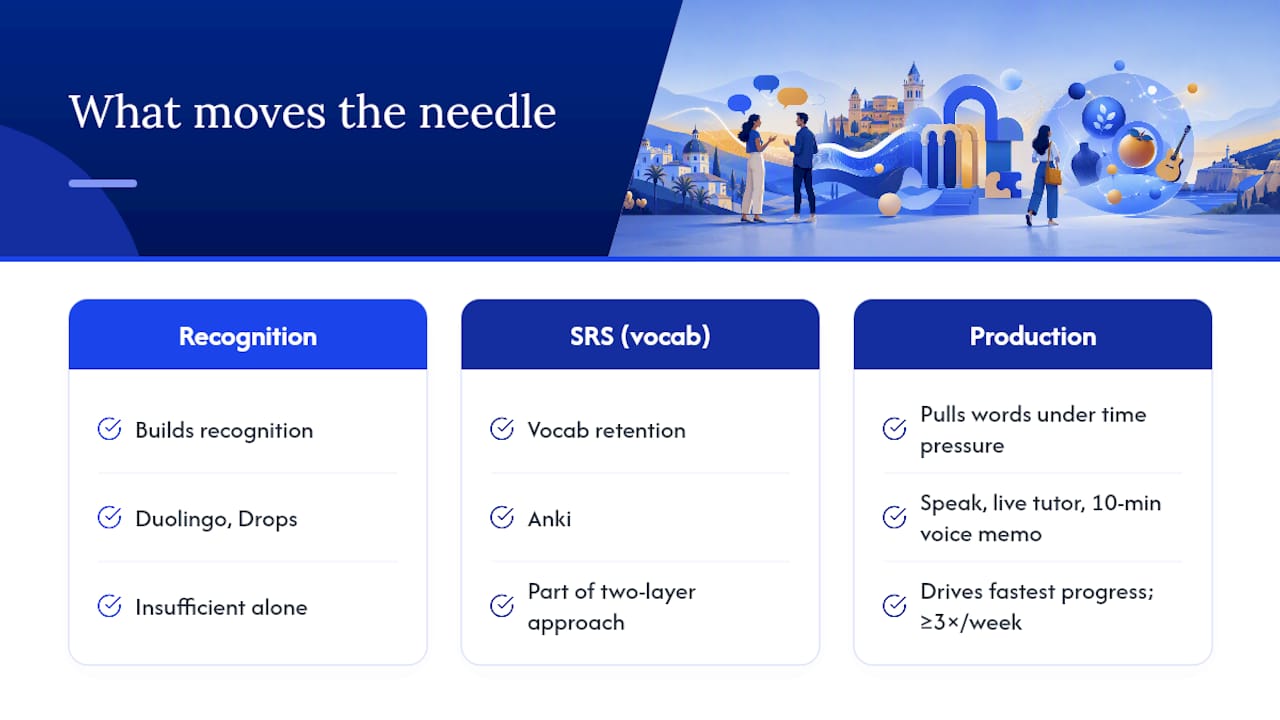
What actually accelerates progress is the combination of recognition and production. Apps like Duolingo and Drops are excellent at building recognition: you see a word, you identify it, you move on. But speaking a language requires production, pulling words and grammar from memory under time pressure. That’s a different cognitive task, and most apps underserve it.
The learners who make the fastest progress tend to use a two-layer approach: an SRS tool like Anki for vocabulary retention, plus a production-focused activity (Speak, a live tutor session, or even a 10-minute voice memo in Spanish) at least three times per week. The practice workflow that combines apps with live practice is worth reading before you build your routine.
One concrete tip you can try this week: after each Babbel or Duolingo session, spend 5 minutes recording yourself summarizing what you just learned in Spanish. Play it back. The gap between what you think you can say and what comes out is exactly where your real learning happens.
Sources
- Best Apps To Learn Spanish (Reviews & Rankings) | Guide2Fluency
- Wlingua – Learn Spanish – Apps on Google Play
- Here’s the Best App to Learn Spanish (Trust Me, I Tried 5!)
Vendor pages reflect marketing claims. Independent reviews and hands-on testing notes carry more weight for curriculum and feature comparisons.
FAQ
What is the most effective Spanish learning app?
Babbel is the most effective app for most learners because it combines structured grammar, practical dialogues, and pronunciation feedback in a clear curriculum. For pure habit-building on a free budget, Duolingo is the most practical daily option.
Is Duolingo or Babbel better for learning Spanish?
Duolingo is better for building a consistent daily habit; Babbel is better for learners who want a structured curriculum with real grammar and conversation practice. Most serious learners benefit from using both together.
Is there a better app than Duolingo for Spanish?
Yes. Babbel offers more structured grammar and practical conversation, Anki delivers superior vocabulary retention, and Speak provides real AI speaking practice. Duolingo’s advantage is its free tier and habit-forming design, not its curriculum depth.
Is there a 100% free Spanish learning app?
Duolingo’s full app is free with no paywall on core content. Anki is free on desktop and Android. Readlang and Busuu both offer free tiers with meaningful content, though their best features require a paid subscription.
Recommended
Start Learning Spanish Today
Book a trial class and see how quickly you can progress with a professionally trained native-speaker teacher guiding the way.
Book a Trial Class